
Audit Log
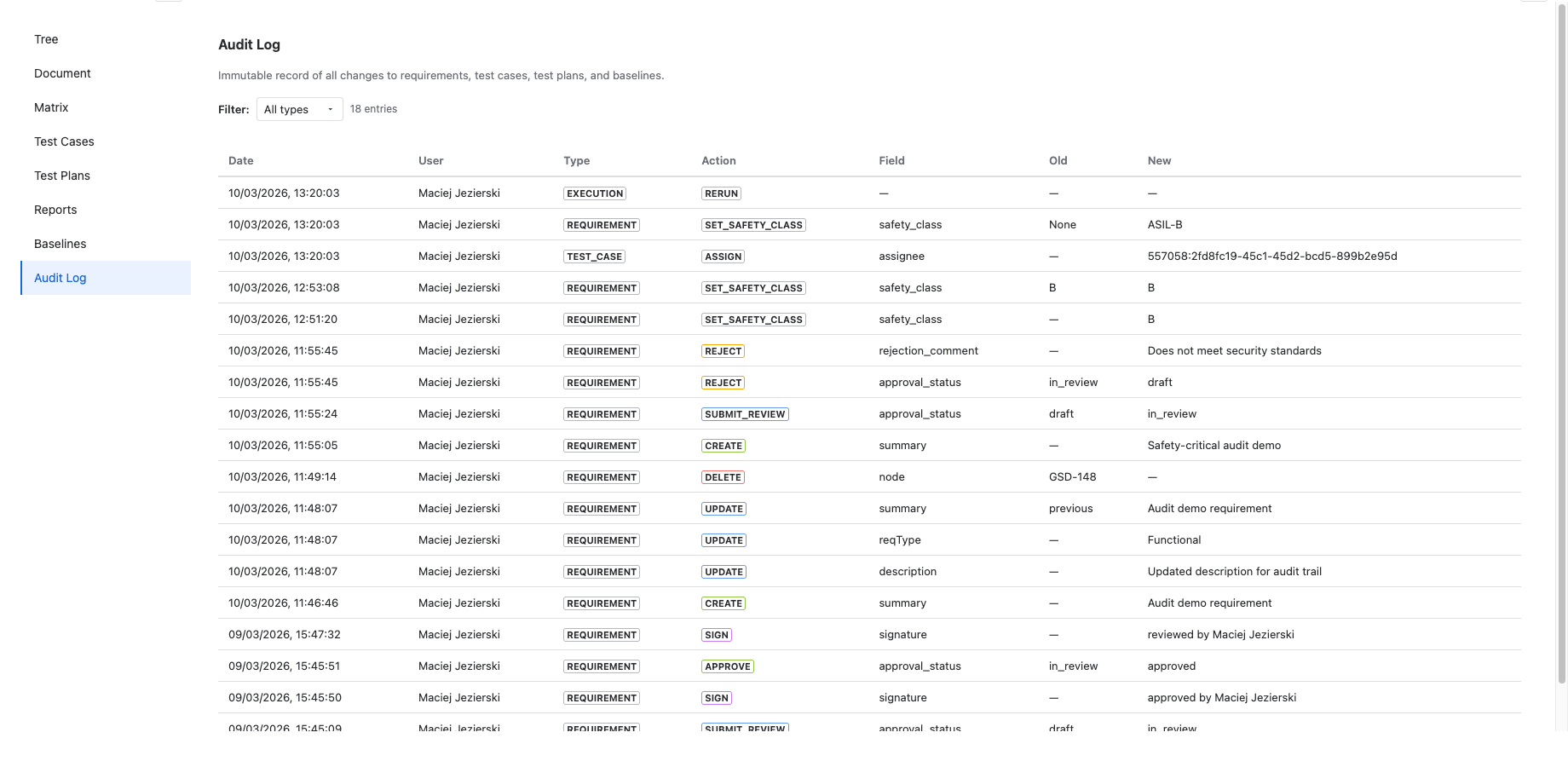
4Spec maintains an immutable audit trail of every action performed within the app. The audit log is designed for compliance with regulated-industry standards that require traceable change history.
What the Audit Log Captures
Every significant action is recorded as an audit log entry. The following action types are tracked:
- create — a requirement, test case, test plan, or baseline was created
- update — a field on an entity was modified
- delete — an entity was deleted
- approve — a reviewer or approver signed off on a requirement
- reject — a reviewer or approver rejected a requirement
- sign — an electronic signature was applied
- set_safety_class — a safety classification was assigned or changed
- assign — a test case was assigned to a user for execution
- rerun — a test case execution was re-run
Immutability Guarantee
The audit log is stored in an insert-only table. Once a record is written, it cannot be edited, updated, or deleted — not by users, not by administrators, and not by the app itself. This guarantees a tamper-proof history of all changes.
This design satisfies the record integrity requirements of standards such as 21 CFR Part 11 and ISO 13485.
What's Recorded Per Entry
Each audit log entry contains the following fields:
| Field | Description |
|---|---|
| Project | The Jira project key where the action occurred. |
| Entity Type | The type of entity: requirement, test_case, test_plan, baseline, test_execution. |
| Entity ID | The unique identifier of the affected entity (e.g., REQ-042, TC-017). |
| Action | The action performed (create, update, delete, approve, reject, sign, etc.). |
| Field Changed | For update actions, the specific field that was modified (e.g., "summary", "safety_class"). |
| Old Value | The previous value of the field before the change. |
| New Value | The new value of the field after the change. |
| User | The Jira account ID of the user who performed the action. |
| Timestamp | The exact date and time the action was recorded (UTC). |
Accessing the Audit Log
The audit log is available as the Audit Log tab in the main 4Spec project page. It displays entries in reverse chronological order (newest first).
Filtering
You can filter audit log entries by:
- Entity type — show only entries for requirements, test cases, test plans, or baselines.
- Action type — filter by specific actions (e.g., show only approvals and rejections).
- Date range — narrow results to a specific time period.
Pagination
The audit log loads entries in pages to maintain performance. Use the pagination controls at the bottom of the list to navigate through older entries.
User Identity Resolution
Audit log entries store Jira account IDs. When displayed, 4Spec resolves these to human-readable display names by fetching user profiles from Jira. This ensures entries remain accurate even if a user's display name changes over time — the original account ID is always preserved.
Using the Audit Log for Compliance
The audit log is designed to support compliance audits for regulated industries. Key standards that require traceable change history include:
- ISO 13485 §4.2.4 — Control of records. Requires that records remain legible, readily identifiable, and retrievable, with changes traceable.
- 21 CFR Part 11 §11.10(e) — Electronic records. Requires audit trails that record the date, time, and identity of the person who created, modified, or deleted electronic records.
The audit log's immutability, per-entry timestamps, and user identity tracking directly address these requirements. Combined with electronic signatures, 4Spec provides a complete audit-ready record.
For a detailed mapping of 4Spec features to specific compliance standards, see the Compliance Mapping page.
Next Steps
- Approvals & Signatures — learn about the approval workflow and electronic signatures that generate audit log entries.
- Compliance Mapping — see how 4Spec maps to ISO 13485, IEC 62304, DO-178C, and other standards.
- Reports — generate audit-ready compliance reports that reference the audit trail.